📱 Update — October 2026: Singing Carrots AI Coach is now also a free iPhone app — Singing Carrots AI Vocal Coach on the App Store. And and Android app. You can still practice in any mobile browser (no download required); the app just gives mobile users a dedicated home for the AI Coach.
When we launched AI Coach in desktop beta, the most common question was: “When can I use this on my phone?”
Today, that wait is over.
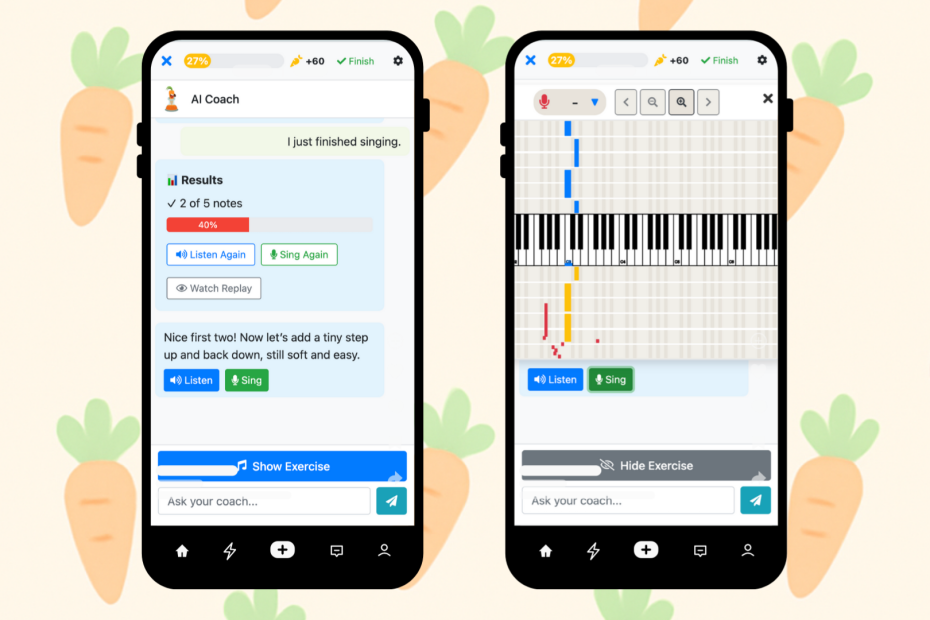
AI Coach now works on mobile browsers—same personalized coaching, same real-time feedback, optimized for your phone screen.
Why Mobile Matters
Desktop-first made sense for our beta. Larger screens, stable setups, fewer variables to debug.
But singing practice doesn’t always happen at a desk.
You might have 10 minutes before work. A lunch break in your car. A quiet moment when the house is finally empty. These windows are precious—and now you can use them.
What’s Different on Mobile?
We didn’t just shrink the desktop version. We rebuilt the experience for smaller screens:
- Chat-first interface — Coaching conversation stays visible; the exercise canvas overlays when you’re actually singing
- One-tap actions — Listen, Sing, and Show Exercise buttons sized for thumbs
- Compact header — Your progress and session controls without eating up screen space
- Auto-hiding visuals — The pitch chart appears when you need it, disappears when you don’t
The core experience is identical: personalized warmups, adaptive difficulty, real coaching guidance. Just reformatted for your pocket.
Same Features, Smaller Screen
Everything from desktop works on mobile:
- Personalized session plans based on your vocal range and goals
- Real-time pitch visualization while you sing
- Adaptive exercises that respond to your performance
- Session summaries with actionable feedback
- Progress tracking toward your daily 300-note goal
Your session history syncs across devices. Start on desktop, continue on mobile, or vice versa.
Best Practices for Mobile Sessions
A few tips for getting the most out of mobile practice:
- Use headphones — Reduces echo and improves pitch detection accuracy
- Find a quiet spot — Background noise affects the microphone more on phones
- Hold steady — Keep your phone at a consistent distance from your mouth
- Portrait orientation — The interface is designed for vertical screens
Who Is This For?
Mobile AI Coach is perfect if you:
- Travel frequently and want to maintain your practice routine
- Have unpredictable schedules and grab practice time when it appears
- Prefer warming up right before performances or rehearsals
- Don’t have a dedicated practice space at home
- Already use your phone for music, lyrics, and backing tracks
How to Access
- Open your mobile browser (Safari, Chrome, etc.)
- Go to singingcarrots.com/ai-session
- Log in with your existing account
- Grant the microphone permission when prompted
- Start your session
That’s it – it works in any modern mobile browser, no download required. Prefer an app? On iPhone, get Singing Carrots AI Vocal Coach on the App Store.
FAQ
Does it work on both iPhone and Android? Yes. Any modern mobile browser with microphone access.
Is there an app? Yes — Singing Carrots AI Vocal Coach is free on the App Store for iPhone. Don’t want to download anything? It also runs in any modern mobile browser (Safari, Chrome, Firefox, Edge).
Is mobile included in my subscription? Yes. If you have access to AI Coach on desktop, you have it on mobile. Same account, same features.
Can I switch between desktop and mobile? Absolutely. Your progress and session history sync automatically.
Is the pitch detection as accurate on mobile? Very close. Phone microphones have improved dramatically. Headphones help.
What about background noise? More of a factor on mobile than desktop. Find a reasonably quiet space for best results.
Does it work offline? No. AI Coach requires an internet connection for the coaching AI.
Will it drain my battery? A typical 15-20 minute session uses moderate battery, comparable to a video call.
Still Evolving
Mobile support is new. You might encounter rough edges. If something feels off, let us know—your feedback shapes what we build next.
Desktop remains the gold standard for serious practice sessions. But mobile opens the door to consistent, daily practice that fits your actual life.