
If you’ve ever wished Singing Carrots felt more like real sheet music training, your wish just came true.
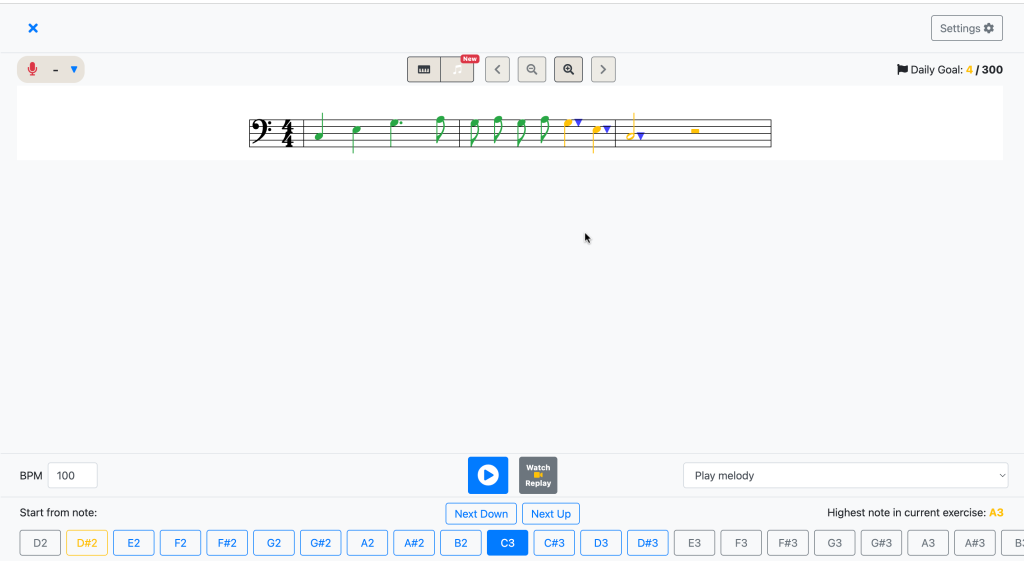
We’re excited to introduce the Notesheet View, a new clef-based interface built right into our Pitch Training Practice Mode. Now, instead of only using the virtual piano, you can read melodies in standard notation and track your pitch accuracy directly on a musical staff — perfect for sight-singing practice and building stronger music-reading skills. It’s the best way to practice sight singing if you want to connect visual notes to vocal output.
What You Can Do with the Notesheet View:
- 🎼 See the melody in standard notation as you sing – great for learning how to practice sight-singing
- 🟢 Get instant pitch feedback with real-time accuracy highlighting, supporting accurate sight-singing development
- 🎯 Use transposition controls to practice the same melody in different keys, an essential tool in sight singing practice
- 👀 Switch seamlessly between piano view and sheet music view depending on your learning style
Whether you’re training your ear, preparing for music exams, or just learning to read music, the clef view makes it easier to connect what you see with what you hear – an essential part of mastering how to practice sight-singing..
Ready to try it?
Head to Pitch Training Practice Mode and click the 🎵 icon to get started.
Happy singing!